.png?width=180&height=49&name=Wibbi_Primary-FullColour%20(4).png)
Watch the Video Guide
The Daily Report gives you a convenient summary of recent patient activity in Wibbi. It is sent once per day to the email address associated with your Wibbi professional account.
Here’s an example of a Daily Report
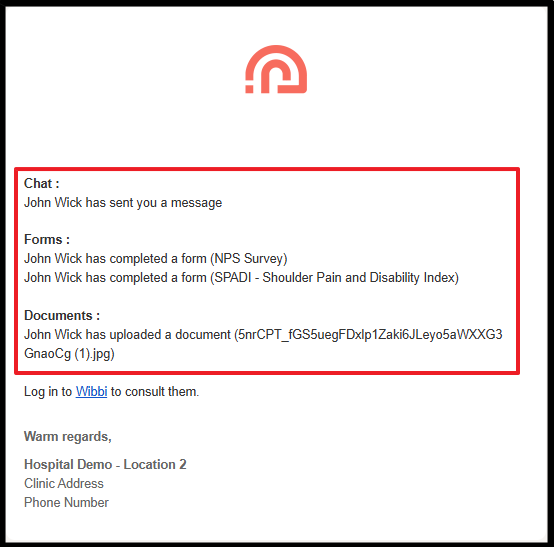
Your Daily Report includes:
- Unread patient chat messages (if chat is enabled)
- Completed forms
- Documents uploaded by patients
Client Profile View:
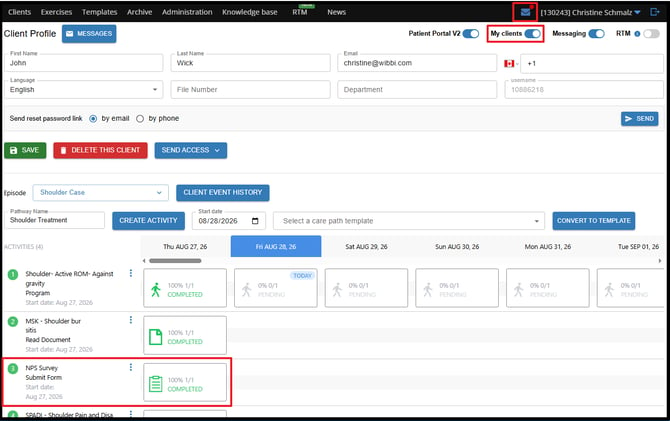
Only activities from patients you own will appear in your Daily Report. Patients you create are automatically assigned to you as the client owner. Client ownership can be managed from the Client Profile or Client List
To manage your Daily Report settings navigate to your USER PREFRENCES
Click your name in the top-right corner, then select the cogwheel/gear icon to open your User Preferences.
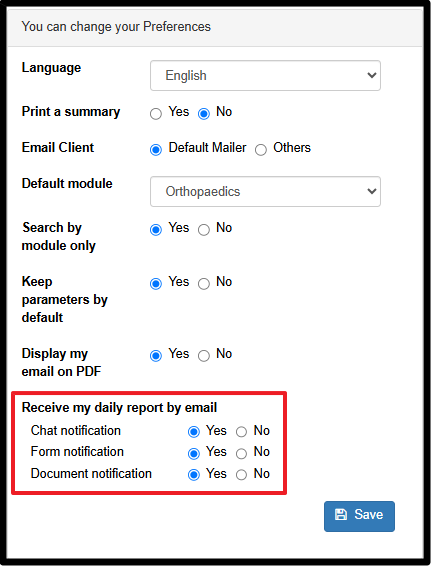
From the User Preferences page, you can choose your Daily Report notification settings
If you have questions or feedback about the Daily Report, please contact support@wibbi.com.